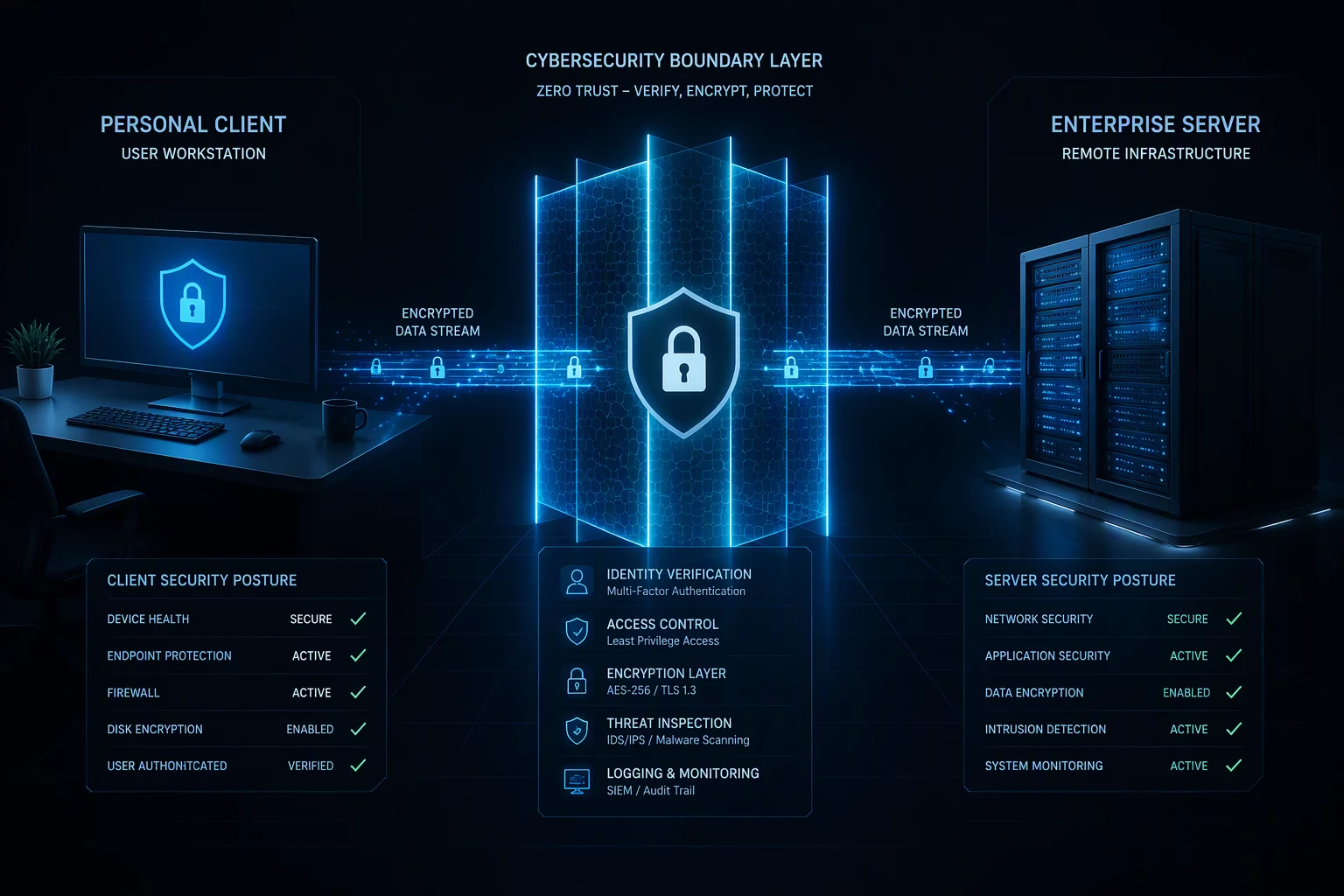
Essential Boundary Principles
- The local workstation acts as the primary trust perimeter; any compromise at the client level cascades into the remote session.
- Bi-directional clipboard sharing and peripheral tunneling should follow zero-trust filtering policies rather than open passthrough.
- Local screen capture caching and diagnostic logging must prevent sensitive corporate pixels from lingering on personal storage.
Table of Contents
Local Security Vectors & Control Planes
Peripheral Tunneling
Filter unverified USB descriptors and HID commands locally to prevent unauthorized device redirection from hijacking host sessions.
Clipboard Mediation
Restrict bidirectional text and binary scraping between host and guest environments to sanitize transient system memory.
Memory Protection
Shield video framebuffers and decryption keys in local hardware-backed enclaves away from background consumer software.
Keystroke Sanitization
Isolate hardware input queues from local hook utilities to ensure login credentials pass directly into encrypted remote streams.
Boundary Hardening Checklist
Field Verification Checklist
- Validate endpoint posture before the session opens — a compromised local device invalidates every remote-side control.
- Verify the transport is the tunnel you configured, not a downgrade path the client silently negotiated.
- Lock the remote session whenever the local workstation is unattended; context persistence should never outlive physical presence.
- Audit clipboard and file-sharing channels explicitly — ambient convenience channels are where boundary policy quietly fails.
Trust Runs One Direction
The local boundary is asymmetric by nature: the remote host is the asset being protected, and the local device is the variable. Every mapping decision should honor that asymmetry — local inputs can flow in, but remote secrets should flow out only through channels that are named, logged, and revocable.
This is why "full convenience" configurations fail audits. Drag-and-drop, bidirectional clipboard, and ambient drive mapping each erase the distinction between environments. Boundary security is not refusing to connect; it is insisting that every crossing point is a choice.
Preventing Data Contamination Across Workstations
When remote access bridges physical home computers and corporate desktop environments, the boundary between them represents the most vulnerable operational interface. The host operating system retains authority over video output, keyboard injection, and peripheral busses. Without deliberate boundary defenses, malicious processes residing on a personal computer can observe unencrypted display pixels or siphon sensitive clipboard contents in real time.
Effective boundary control treats the local client device as an untrusted edge node. File transfer subsystems must enforce unidirectional permission checks, preventing background scripts from automatically downloading artifacts to local storage without operator confirmation. Furthermore, modern remote protocols implement granular policy gates that permit screen rendering while prohibiting raw file system mounting or unattended remote shell invocation.
A remote session is only as secure as the physical client rendering its pixels. If the boundary fails locally, the entire remote perimeter collapses.
— Sarah Jenkins, Senior Systems Security Specialist
Hardening the local boundary involves turning off unnecessary bridging services. Disabling audio input passthrough when not in a conference call, restricting virtual channel access, and isolating browser cookies ensures the remote session remains an encapsulated visual sandbox rather than an open tunnel into the local network.
Recommended Boundary Configuration Specs
| Operational Parameter | Standard Context | Optimal Recommendation | Impact Factor |
|---|---|---|---|
| Clipboard Sharing Mode | Bidirectional Plaintext & Files | Directional Text-Only (Remote to Local Disabled) | Critical |
| USB Peripheral Redirection | Full USB Device Passthrough | Whitelist Verified HID Only | High |
| Framebuffer Cache Persistence | Ephemeral Temp Files on Disk | RAM-Only Volatile Decode Buffers | High |
| Session Lock Timeout | 30 Minutes Inactivity | 10 Minutes with Local Screen Blanking | Moderate |
Discussion & Insights
Zack M.
08/26/2026Security boundaries are critical.
Leave a Methodological Observation